
FIRE PLANES Guides
From first takeoff to Town Defender, without wasting a tank of water.
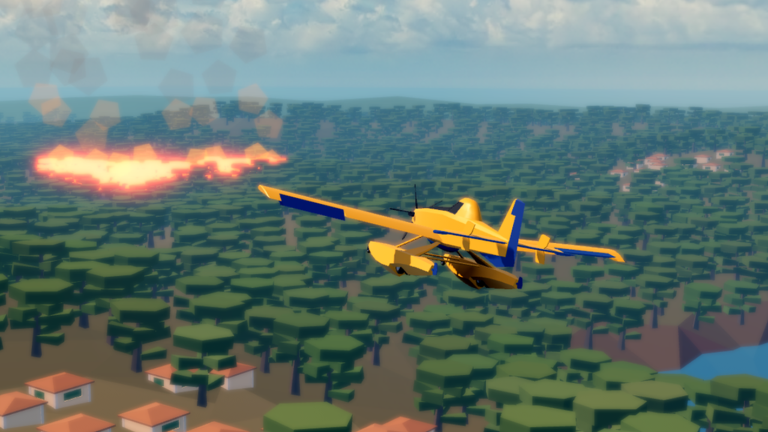
This hub is the map of every FIRE PLANES tutorial on the wiki. The game looks simple from the Roblox page — scoop, drop, buy a bigger plane — but the first hour is where most pilots stall. Pitch feels inverted, lakes refuse to fill the tank, and a six-player vote can throw you into Mega Fire before you know how to hold altitude. Use the pages below in order if you just installed the experience, or jump to the pain point that already cost you a round.
Start with Getting Started for the full first-session loop, then Controls if W dives the nose. How to Scoop Water is the mechanic that actually prints money. When you can fill and dump on command, read Game Modes so you stop voting blind, then Earn Money Fast and Protect Towns for the payouts that fund the amphibious tanker.
What these guides assume
FIRE PLANES is a live Roblox action flight game by a_mb0385, released 3 February 2026, with servers of six. Maps regenerate every round. The official description lists airplanes and helicopters, Realistic / Town Defense / Mega Fire, and a cash loop that ends in the plane shop. We do not invent plane names the shop does not show; we describe airframes you can see in official thumbnails and in public gameplay: a fast single-engine starter, a slower twin-engine amphibian that sat near $500,000 in June 2026 videos, and a helicopter with a bucket. Later patches can add more — check the changelog after shop updates.
First hour path
- Join, vote Realistic, and survive one full round without crashing into trees.
- Open the gear menu and decide invert pitch before you blame the flight model.
- Practice one clean lake scoop, then one drop that actually kills a fire cell.
- Prioritize houses and civilians over empty forest.
- Bank cash toward the large amphibian instead of Robux money packs unless you already want Double Money.
How-to intents we cover
- How to play the round loop: Getting Started
- How to fly on keyboard, gamepad, and mobile: Controls
- How to fill the tank: How to Scoop Water
- How to pick Realistic vs Town Defense vs Mega Fire: Game Modes
- How to get cash without the pass: Earn Money Fast
- How to beat Town Defense’s ten waves: Protect Towns
- How to stop first-hour crashes: Tips
- How to read a new layout: Maps
- How to fly the orange rotorcraft: Helicopter
- Whether the game is for you: Review
If you only came here for a code box, skip to the codes hub. If you want ranks, open the plane tier list. Badge hunters should start at badges because Most Fires Extinguished and Town Defender have party requirements the solo queue will not meet. Returning players who just want a verdict can open the review instead of the full first-hour path.
How we write these pages
Every guide is based on the public Roblox listing, official thumbnails, badges, the Double Money pass, and recorded sessions from Poko and Superlex Plays. When a number is only confirmed in a June 2026 video (the $500,000 tanker, two shop airframes at that time), we label it as dated. We do not pad pages with generic Roblox advice. If a control or shop row changes, we patch the updates hub first, then the matching guide.
Use the money planner when you want a round-count estimate, and the drop planner when you keep missing fire lines. Official links and the creator profile live on the links hub.
Frequently Asked Questions
Quick answers for FIRE PLANES pilots.
Which FIRE PLANES guide should a new player open first?
Open Getting Started first, then Controls if the plane dives when you press W.
Do these guides work on mobile?
Yes. The loop is the same. Touch sticks replace WASD; Space is still the water drop. Details are on the controls page.
Is there a walkthrough for Town Defense?
Yes. Protect Towns covers the ten-wave badge and why houses beat forest.